
Easy Power BI Templates for Xero
Download our free, customisable, and ready-to-use Power BI templates.

Visualise Your Xero Data in Minutes!
Plug your Xero data into Microsoft Power BI and instantly bring your financials to life with fully customisable profit, cashflow, forecasts, sales pipeline and customer metrics templates, turning raw numbers into clear, interactive insights with just a few clicks.
Power BI Templates include:
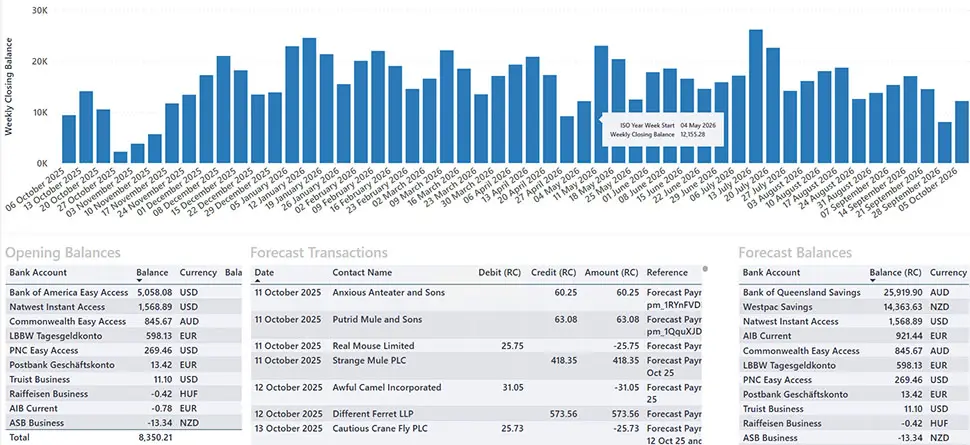
Cashflow Forecast Template
Turn historical trends into live, automatic forecasts. Build rolling weekly or monthly cash-flow projections that update with every bank feed, essential for managing growth or preparing for seasonal dips.
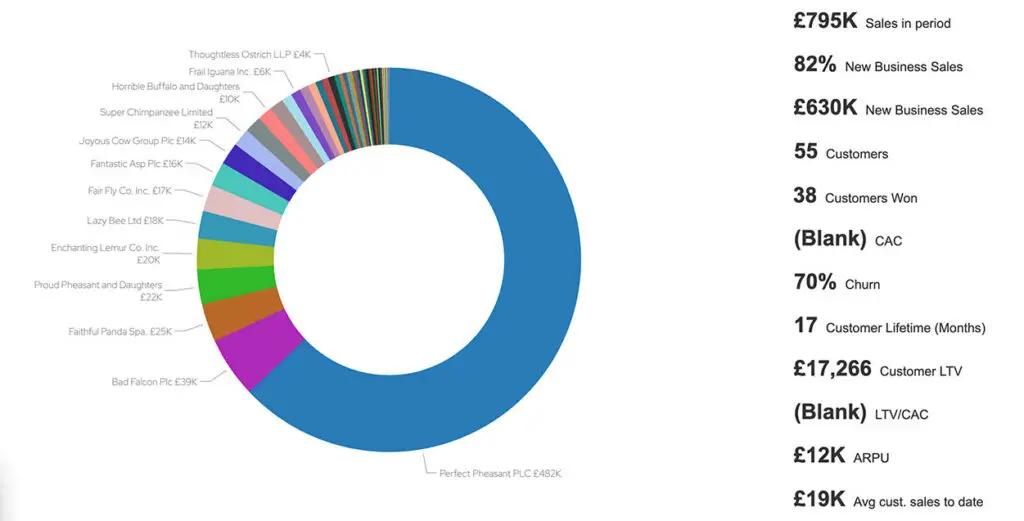
Sales KPIs Template
Keep your go-to-market team focused on the right metrics: Customer Acquisition Cost (CAC), Lifetime Value (LTV), New Business %, and more. Drill down by channel or rep to find what’s driving ROI.
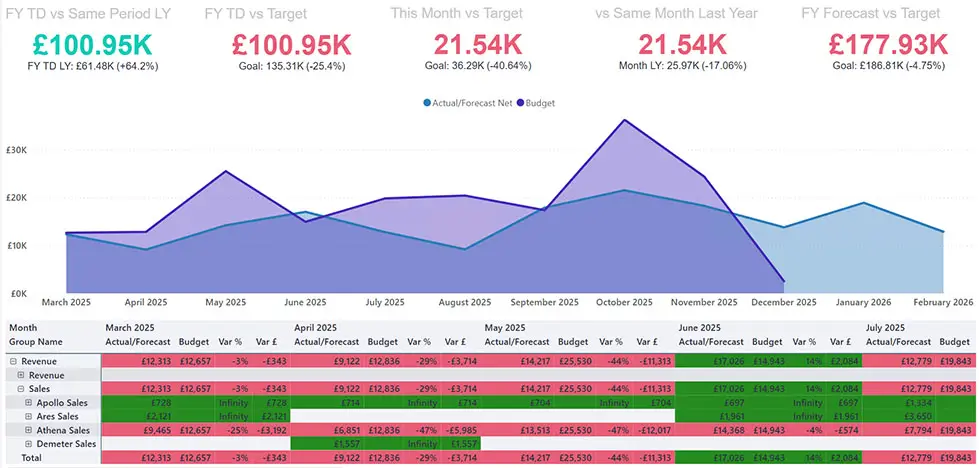
Actual vs Budget Template
Compare actuals, forecasts, and budgets side-by-side. Instantly see where departments are overspending or under-investing so you can take corrective action before month-end.
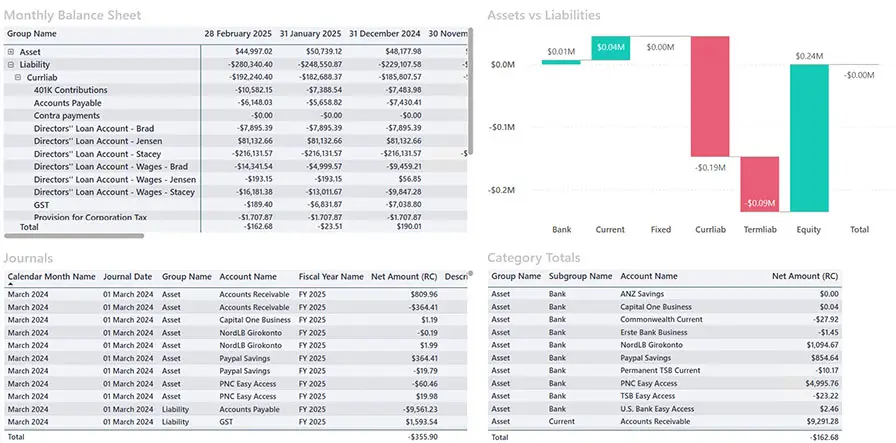
Balance Sheet Template
Stop digging through static reports. Our interactive balance-sheet view lets you monitor assets, liabilities, and equity at a glance, updated as soon as new transactions sync. Perfect for board packs or investor updates where accuracy and speed matter.
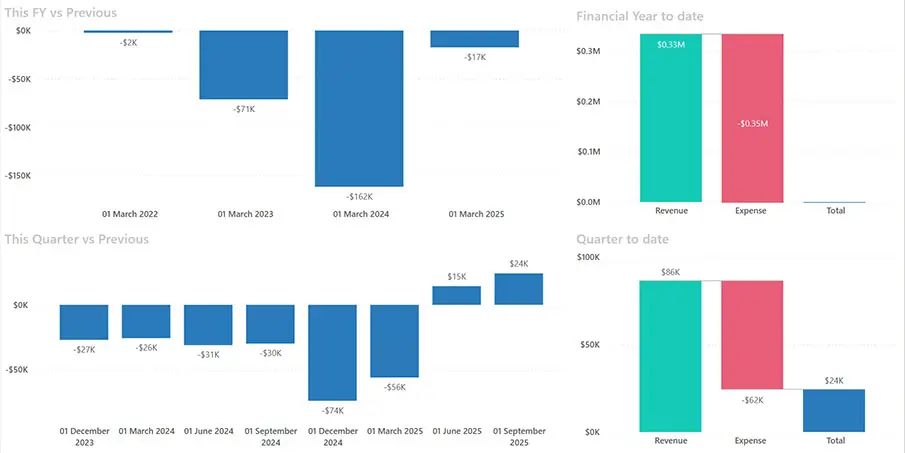
Profit & Loss Template
See real-time P&L straight from Xero. Spot overspending early, measure gross vs net profit by product line or region, and share visual reports with non-finance colleagues who need to understand the story behind the numbers.
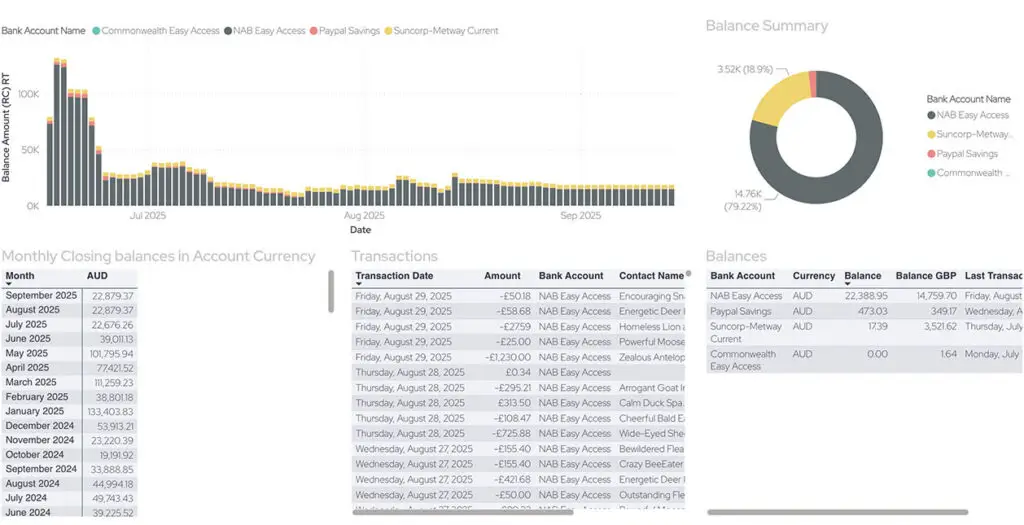
Bank Balances Template
No more hopping between bank apps. Instantly view consolidated account balances and recent transactions inside Power BI so your finance team and leadership are always on the same page.
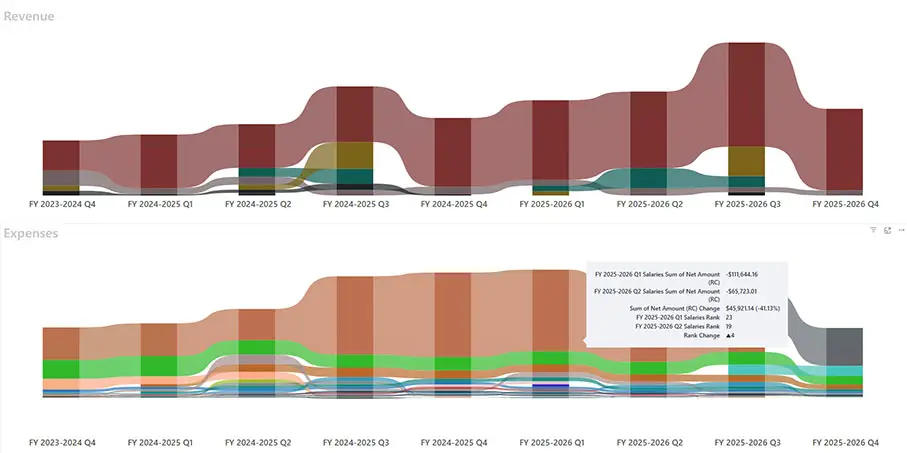
Revenue vs Expense
Template
Track cost and income trends over time with clean visuals that highlight margin erosion or unexpected cost spikes, ideal for management meetings.
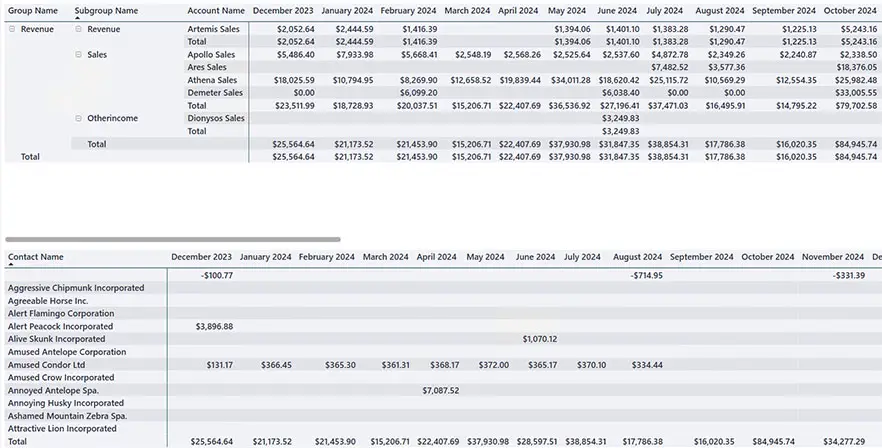
Monthly Revenue by Service Template
Understand which services are driving recurring revenue. Analyse historic performance, see seasonal patterns, and project future income with confidence.
Quote Pipeline
Template
See your Xero quote pipeline from lead to close. Identify bottlenecks, forecast upcoming revenue, and help sales teams prioritise deals more effectively.
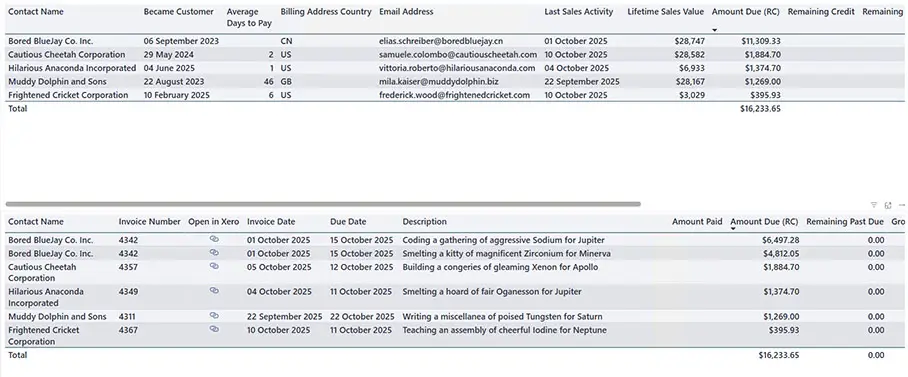
Aged Debtors &
Creditors Template
Stay ahead of overdue invoices and supplier payments. Monitor average days to pay, track customer sales history, and keep cash-flow healthy without endless spreadsheet reconciliations.
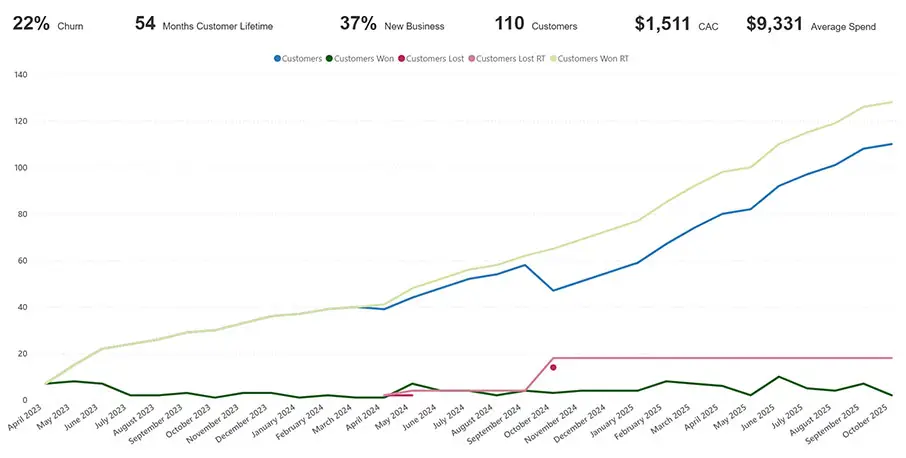
Customer Acquisition
Template
Visualise new-customer growth alongside churn rates. Quickly see how marketing campaigns or seasonal factors impact retention and acquisition.
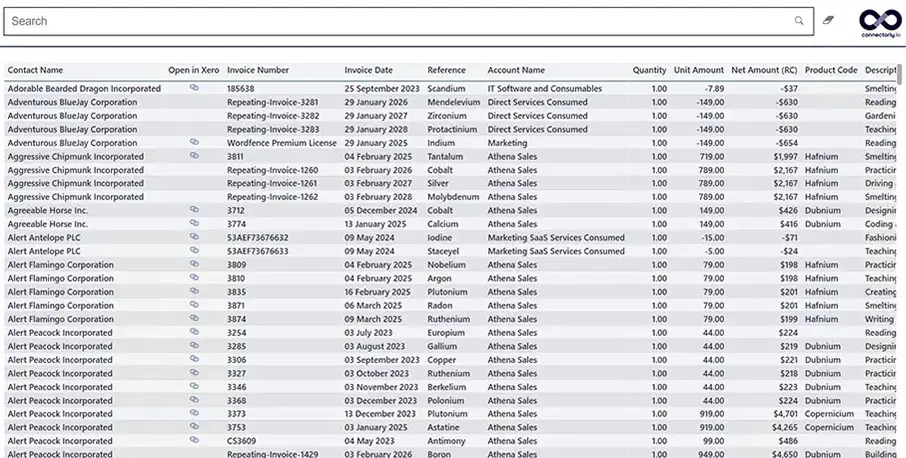
Find Invoice
Template
Need a past invoice for an audit or client query? Search by description or amount and pull it up in seconds — no more scrolling through lists in Xero.
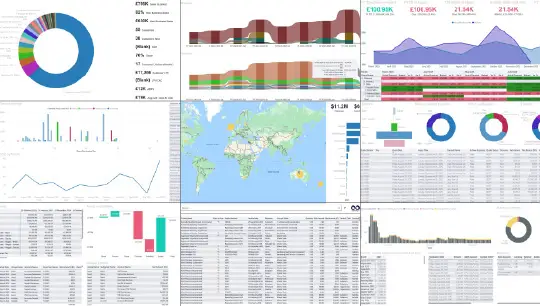
Xero All-In Template
For power users: every Xero-linked template in one combined dashboard so you can explore finance, sales, and cash-flow metrics without switching views.
Why Use Connectorly Power BI Templates?
Bring clarity to your business data in minutes.
Key Benefits:
- No-code setup - connect your data sources in minutes
- Professional, pre-built dashboards
- Works with Xero and Xero Projects
- Fully customisable visuals for your reporting needs
- Designed to scale with your business

Complete Visibility into Your Xero Projects
Connectorly for Xero Projects brings project and accounting data together in one place. Easily track profitability, costs, and performance with our all-in-one Power BI template.
How It Works
Connect. Visualise. Grow.
- Start a Free Trial - Connect your Xero account securely.
- Select a Template - Choose the dashboard that fits your needs.
- Customise in Power BI - Modify visuals and metrics to match your goals.
- Share Results - Publish insights instantly across your team.

Real Results for Finance Professionals and BI Consultants
Win-Win
"Connectorly helped me turn a 12-hour integration job into 45 minutes of setup. My client was blown away, and I got paid for the referral. Win-win. "
Need Help?
Frequently Asked Questions
What are Connectorly Power BI Templates for Xero?
Connectorly Power BI Templates for Xero are ready-made report templates designed to help you turn your Xero data into clear, interactive dashboards in Power BI. They give you a faster way to report on financial performance, cash flow, revenue, expenses, budgets, and other key metrics without having to build everything from scratch.
Who are these templates designed for?
These templates are built for businesses, accountants, finance teams, consultants, and Power BI users who want faster access to meaningful Xero reporting. They’re especially useful for anyone who wants to analyse financial data in more detail, improve visibility, and reduce the time spent building reports manually.
Do I need to know how to code or build dashboards in Power BI?
No. Connectorly’s templates are designed to be easy to use, with no coding required to get started. You can connect your Xero data and begin using prebuilt reports in Power BI Desktop straight away. If you want to customise your reporting further, you can also use the templates as a starting point for your own dashboards.
How do I connect Xero to Power BI with Connectorly?
Getting started is simple. First, create your Connectorly for Xero and Microsoft Power BI connector and connect it to your Xero organisation. Then download your chosen Power BI template, open it in Power BI Desktop, and enter your Connectorly connection details. Once connected, your Xero data will populate the report automatically.
What’s included in the Connectorly Power BI templates?
Connectorly offers a wide range of templates to support different reporting needs. These include financial reports such as Profit & Loss, Balance Sheet, Cashflow Forecast, and Bank Balances, as well as operational and performance reports like Sales KPIs, Revenue vs Expense, Forecast vs Budget, Aged Debtors, Aged Creditors, and more. There is also an Empty template for users who want to build their own reports using Connectorly’s data model.
Can I use these templates for financial reporting in Power BI?
Yes. The templates are built specifically for financial reporting and analysis using Xero data in Power BI. They help you report on profitability, financial position, cash flow, budgets, forecasts, and performance trends, giving you a more flexible and visual way to work with your finance data.
Do the templates work with Xero Projects?
Yes. Connectorly also offers templates for Xero Projects, including reporting that combines project and accounting data in Power BI. This makes it easier to analyse project performance alongside financial results in one place.
Can I combine Xero data with other sources like HubSpot?
Yes. Connectorly makes it possible to combine Xero data with other business systems in Power BI, including platforms like HubSpot. This allows you to create broader reporting across finance, sales, CRM, projects, and other parts of the business, all in one dashboard.
Are there free Power BI templates available?
Yes. Connectorly’s Power BI templates are available free of charge, giving you a ready-made starting point for building reports with your Xero data in Power BI.
What do I need to run these templates (Power BI licenses)?
To use the templates, you’ll need a Windows computer with Power BI Desktop installed. Power BI Desktop is free to download. If you want to publish reports and share them with others, each viewer will need the appropriate Power BI licence. For the best experience, Connectorly recommends using a machine with strong performance, especially when working with larger datasets.