Xero + Microsoft Power BI Integration
Your Xero numbers. Explained in Power BI. Automatically Updated.
Connect Xero to Microsoft Power BI without manual exports, custom API development or complicated data pipelines.
Get detailed, regularly refreshed Xero data, ready for financial dashboards, management reporting and analysis across multiple organisations. Start a free trial — no credit card needed.
The problem
Getting Xero data into Microsoft Power BI shouldn't be the hard part
Stop wasting time exporting data
Downloading Xero reports, reshaping data in Excel and refreshing Power BI wastes time and creates opportunities for mistakes. Automate the connection instead.
Stop maintaining custom integrations
Authentication, pagination, API changes and data extraction can turn a reporting task into an ongoing development project. Connectorly gives you a reliable and maintained integration.
Stop rebuilding for every organisation
Start from report templates and a repeatable data foundation. Tailor it for clients, subsidiaries and businesses that need different reporting views.
What you can build
From Xero Transactions to Useful Business Insight
Use detailed Xero data in Power BI to build reports suited to the decisions you need to make.
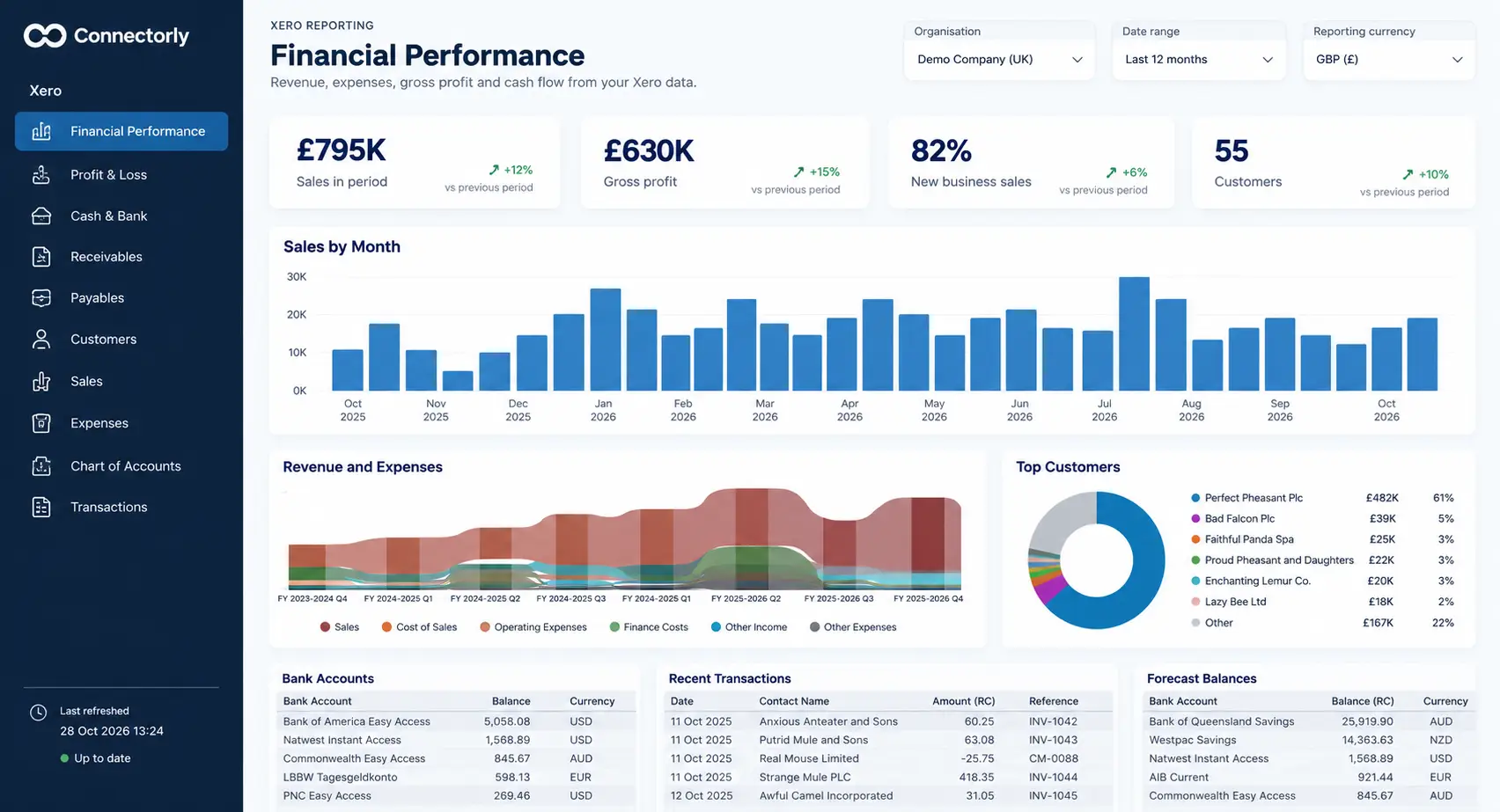
Financial performance dashboard
Explore revenue, expenses and profitability over time, with the detail to investigate accounts and transactions.
Profit and loss analysis
Compare financial periods and analyse performance by account or reporting category using your own Power BI measures.
Cash and bank reporting
Bring bank balances, receivables and payables into a reporting model to investigate cash and working capital.
Multi-organisation reporting
Automatically rebase Xero financial data to a common reporting currency and build group reports, with appropriate account mappings, currency rules and intercompany treatment in Power BI.
Reports you can adapt
Start with available templates or create your own Power BI reports, calculations and visualisations.
Report Templates
Start with our Free, Fully Customisable Power BI templates
Some of the report templates that ship with the Xero connector — use them with your own, regularly refreshed Xero data.
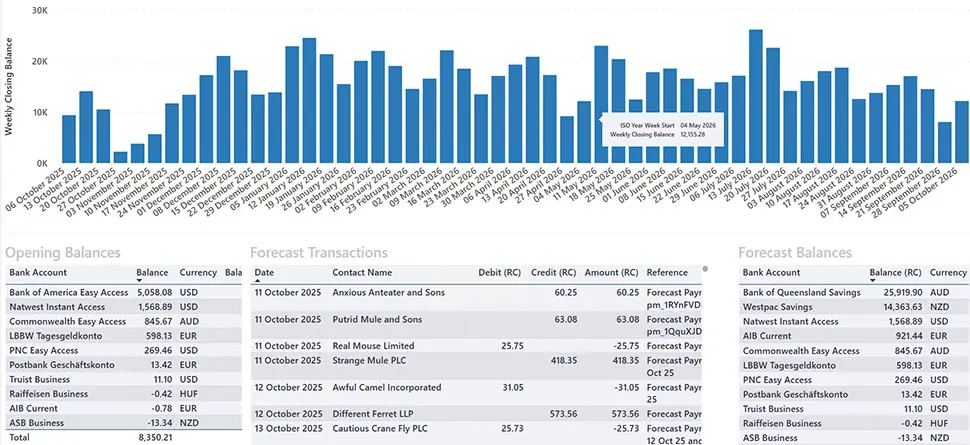
Cashflow Forecast
Turn historical trends into live, automatic forecasts. Rolling weekly cash-flow projections are built automatically from forecast invoices, bills and update with every bank feed, essential for managing growth or preparing for seasonal dips.
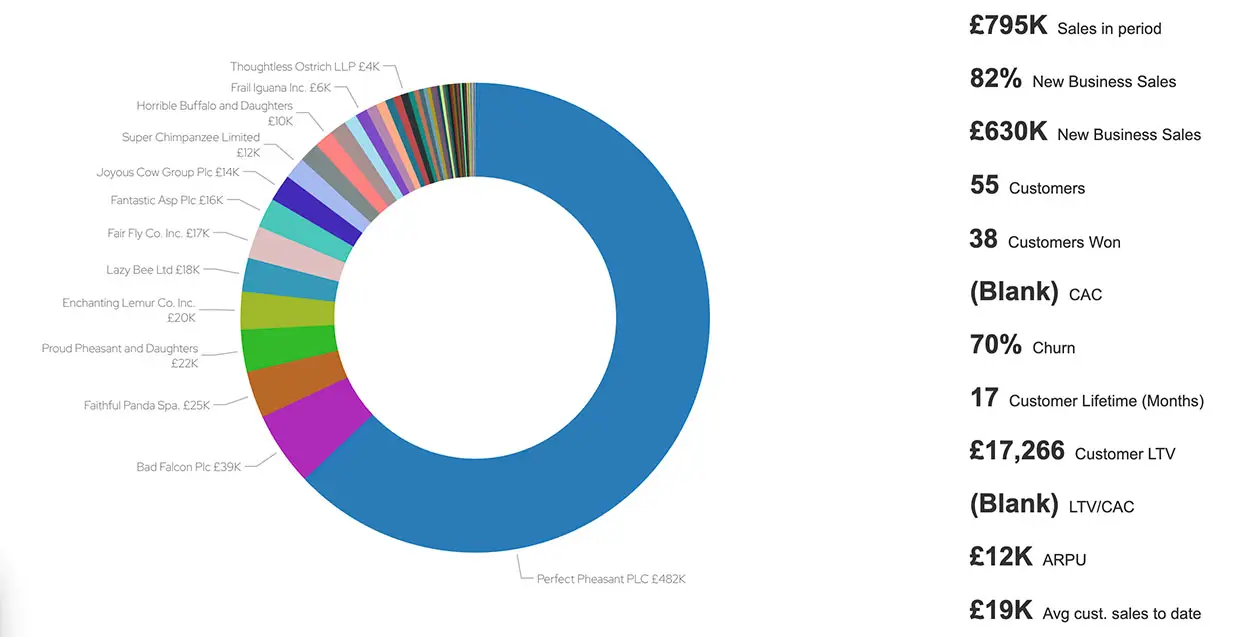
Sales KPIs
Keep your go-to-market team focused on the right metrics: Customer Acquisition Cost (CAC), Lifetime Value (LTV), New Business %, and more. Drill down by channel or rep to find what's driving ROI.
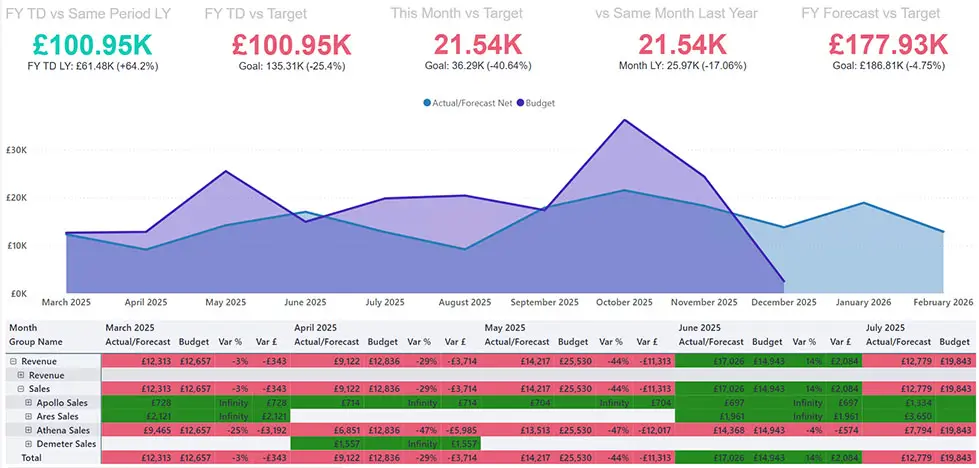
Actual vs Budget
Compare actuals, forecasts, and budgets side-by-side. Instantly see where departments are overspending or under-investing so you can take corrective action before month-end.
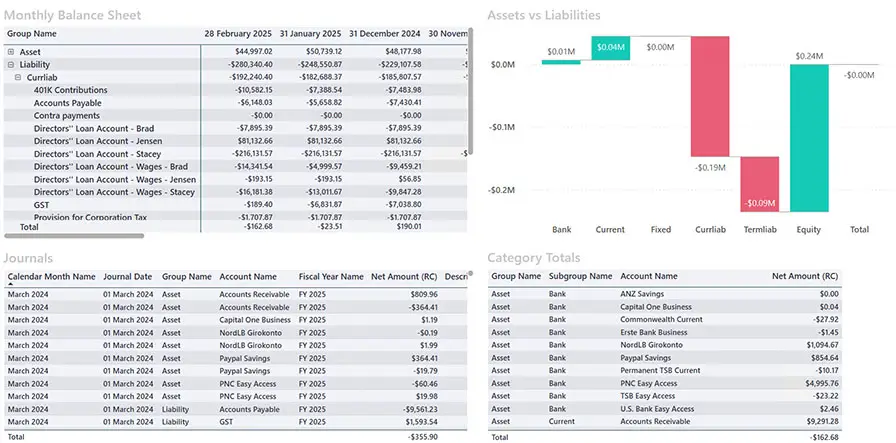
Balance Sheet
Stop digging through static reports. Our interactive balance-sheet view lets you monitor assets, liabilities, and equity at a glance, updated as soon as new transactions sync. Perfect for board packs or investor updates where accuracy and speed matter.
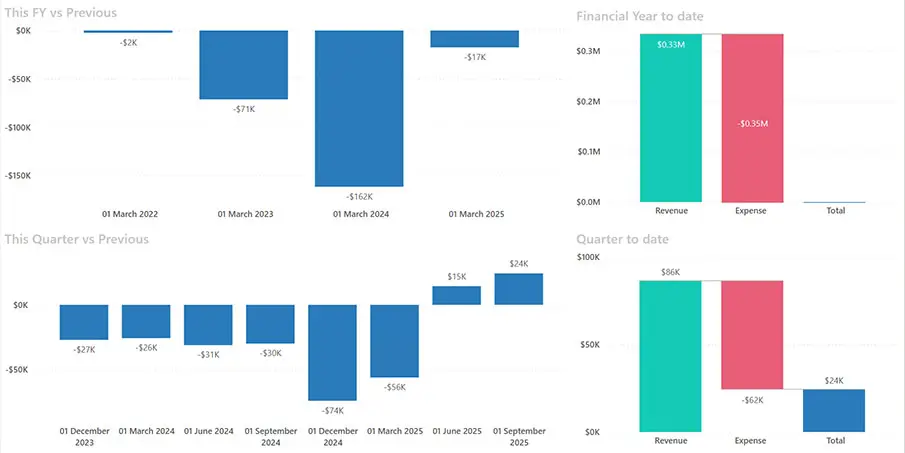
Profit & Loss
Compare financial periods and analyse performance by account or reporting category using your own Power BI measures and share visual reports with non-finance colleagues who need to understand the story behind the numbers.
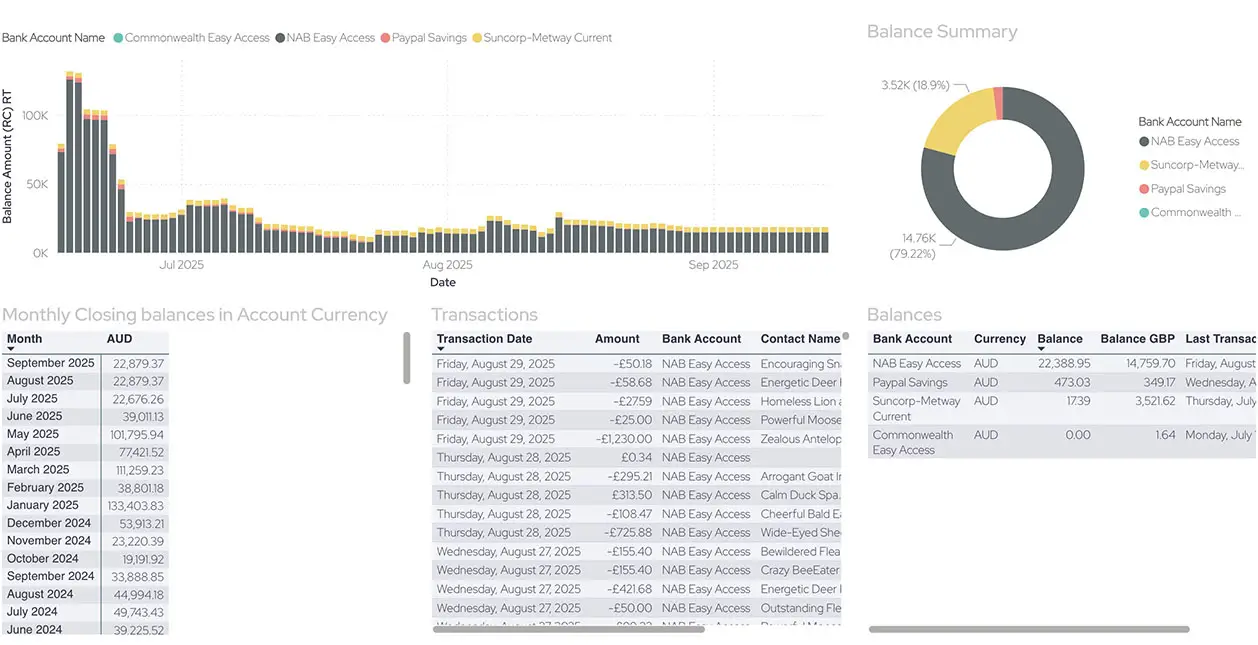
Bank Balances
No more hopping between bank apps. Instantly view consolidated account balances and recent transactions inside Power BI so your finance team and leadership are always on the same page.
Capabilities
What you can do with it
01
Combine and compare multiple Xero organisations
Bring financial data from multiple Xero organisations together, even when they use different account structures or currencies.
Unified chart of accounts Automatically create a combined set of account codes and standardise their labels across organisations.
Consistent tracking categories Resolve inconsistencies in how Xero returns tracking categories, so reporting remains consistent.
Reporting currency conversion Choose from 180 Currencies and rebase financial data from multiple Xero's into a single, consistent reporting currency for group analysis.
Budget comparisons Compare multiple budgets against actual performance and each other.
02
Enriched Financial data that goes beyond Xero's API
We reconstruct and enrich financial information that isn't directly available or consistently presented through Xero's API.
Bank transaction reconciliation Reconstruct bank transaction data from accounting journals to address gaps in the standard API.
Currency movements Unrealised foreign exchange movement journals and bank revaluation journals are generated that explain these movements.
Consistent invoice amounts Normalise net, tax and gross values regardless of whether invoices were originally entered inclusive or exclusive of tax.
03
Look forward, not just backwards
Go beyond historical accounting reports to understand what could happen next.
Forecast recurring revenue and costs Automatically generate future invoices and payments from repeating invoices.
Model cash flow Use projected transactions and payment dates to build forward-looking cash flow reports.
Compare budgets and actuals Explore variances and alternative financial scenarios in Power BI.
04
Understand your Customers, Suppliers and Sales Pipeline
Turn individual transactions into meaningful business insights.
Customer Lifetime Value Highlight key customer relationships by product or service line, retention.
Supplier Lifetime vVlue Understand spending patterns and the value of supplier relationships.
Payment Behaviour Identify whether customers are paying faster or slower, and monitor changes in supplier payment patterns.
Sales Pipeline Analysis Use more meaningful quote statuses, distinguishing between active and expired quotes, including drafts and sent quotations.
Accountants | Fractional CFOs | Developers | Consultants | Finance Teams
Reliable Xero data. For One Business or Fifty
Accountants and advisory practices
Turn management reporting into a repeatable service
Deliver professional, adaptable Power BI reporting to clients without preparing fresh spreadsheets every month. Spend more time advising and less time collecting data.
Power BI consultants and developers
Build the dashboards. Leave the Xero integration to us.
Set-and-forget with Connectorly and use structured, documented Xero data rather than building a bespoke API pipeline with reliability concerns.
Finance teams and business groups
Bring financial reporting together
Create reporting across multiple Xero organisations, compare entities and drill into performance. Configure group reporting rules in your Power BI model.
How it works
From Xero to Power BI in three steps
1
Connect Xero
Create your Connectorly account and securely authorise the Xero organisations you want to report on.
2
Connect Power BI
Use your Connectorly connection details to access structured Xero reporting data. Start from an available template or develop your own model.
3
Build and refresh reports
Create dashboards and explore your numbers. Connectorly automatically refreshes source data hourly and you can manually refresh at any time.
Reliable by design
Spend less time moving data. More time understanding it.
Enriched Xero data
Access structured, enriched accounting information for detailed reporting. Check the published schema for exact table and field coverage.
Flexible, editable reporting
Use an available Power BI template or build your own relationships, measures and dashboards. Verify reporting calculations against Xero.
Automatic refresh
Connectorly refreshes data every hour. Your Power BI dataset refresh schedule determines when reports reflect those updates.
A maintained product, not a bespoke project
Connectorly manages the Xero integration and provides read-only reporting data access, so you can focus on analysis.
Pricing
Save with an annual or multi-connector subscription
Affordable monthly or annual volume subscriptions, billed per Xero Organisation with unlimited user access. Start a free trial without a credit card.
Price:
Discount:
Price:
FAQ
Questions before you get started
Do I need to code to connect Xero to Power BI?
No coding is required to set up the Connectorly connection. Building advanced Power BI reports may require Power BI knowledge, but you can start with available templates.
Do I need a credit card for the free trial?
No. You can start a free trial without entering credit card details.
Can I connect multiple Xero organisations?
Yes. Connectorly supports multiple Xero organisation connections, useful for practices, consultants and business groups. Any consolidation logic is configured in the reporting model.
How often is my Xero data updated?
Connectorly typically retrieves updated Xero data hourly. Power BI report freshness also depends on your dataset refresh schedule.
Can I build my own dashboards or combine other data?
Yes. Build your own Power BI data model and reports, and combine Xero data with other sources supported by Power BI.
What happens when I start my trial?
Choose how to create your Connectorly account. Account creation and authorising access to Xero data are separate steps. You choose which Xero organisation to connect after creating your account.