Producing a management report for one Xero client is one task. Delivering useful reports every month across a growing client base is a service that needs a repeatable process. Without one, teams can spend more time exporting figures, rebuilding spreadsheets and checking inconsistencies than discussing what the results mean.
A repeatable service does not mean giving every client the same dashboard. It means standardising the reporting calendar, data checks, core financial measures and review process, while tailoring the commentary and business-specific measures to each client.
This guide shows how an accounting practice can design that service, decide when Xero’s own reports are sufficient, and identify when Power BI can add value. The aim is a report the client can use to make decisions—and figures the practice can explain and trace back to the books.
Start With the Decisions Each Client Needs to Make
Before choosing a template or building a dashboard, agree what the client needs to decide each month. A business owner worried about cash needs a different discussion from a leadership team investigating falling margins. The report should make those questions easier to answer, not simply present every figure available in Xero.
For each client, record:
- Who will use the report: the owner, finance team, department managers or board.
- Which decisions it should support: for example, managing cash, controlling costs, reviewing pricing or following up overdue invoices.
- When it is needed: the month-end cut-off, review date and meeting date.
- What must be compared: the prior month, the same period last year or an agreed budget, where reliable comparison data exists.
- Who will explain and act on the results: the person preparing the figures, the reviewer and the client-side owner of each follow-up action.
These answers define a useful core pack. It may include profit and loss, balance sheet, cash position, aged receivables and payables, and a small number of relevant measures. Add budget comparisons only when the client has a meaningful budget. Add operational measures only when their source and definition are clear.
Keep the client’s questions visible throughout the reporting process. If a chart or table does not help answer one of them, it may not belong in the monthly pack.
Standardise the Process, Not Every Client’s Report
A repeatable service needs a consistent way to prepare, check and deliver each report. That does not require identical pages or measures for every client. Standardise the work that protects quality; tailor the analysis that makes the report useful.
Standardise across clients:
- A reporting calendar with a month-end cut-off, preparation date, review date and delivery date.
- A minimum set of source-data and accounting checks before figures are published.
- Clear definitions for common measures, such as revenue, gross profit and overdue receivables.
- A consistent pack structure so clients can find the headline result, supporting detail and agreed actions.
- A review record showing who checked the figures, which exceptions remain open and when the pack was approved.
Tailor for each client:
- Reporting groups that reflect its chart of accounts and management structure.
- Relevant comparisons, such as budget, prior year, branch or product line.
- A small set of industry or operational measures that the client can define and trust.
- Commentary explaining what changed, why it matters and what should happen next.
Start with one documented reporting specification per client. Record the Xero organisation, reporting period, accounting basis, currency, account mappings, measures, intended readers and approval owner. When a definition changes, update that specification before changing the report. This helps the practice explain why a figure differs from an earlier pack and prevents client-specific adjustments from becoming undocumented exceptions.
Where several client organisations are reported through the same process, keep their data, access permissions and review records clearly separated. A reusable workflow should make delivery more consistent without creating a risk of showing one client another client’s information.
Build a Month-End Workflow You Can Repeat
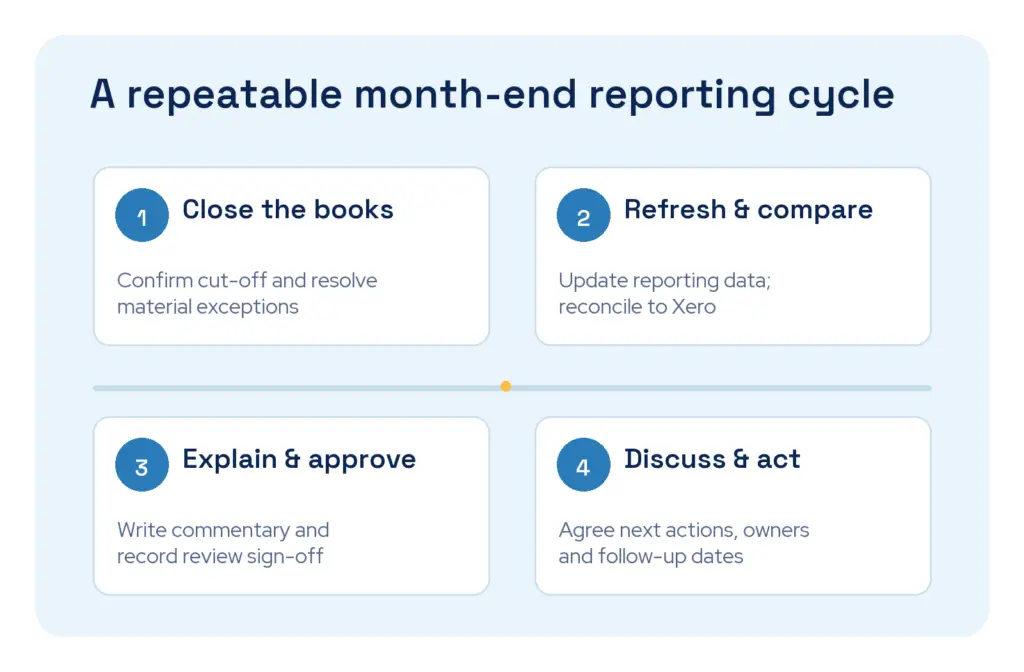
A reliable monthly report begins before anyone opens a dashboard. Give each stage an owner and a deadline, and keep the order consistent from one reporting period to the next.
- Agree the cut-off. Confirm the reporting period and when the client expects the books to be ready for review. Record any transactions or adjustments that are still outstanding.
- Complete the accounting checks in Xero. Review bank reconciliation, transaction coding and relevant control accounts. Investigate material items before treating the month’s figures as final.
- Prepare the source reports. Save the Xero reports needed for comparison, using the agreed organisation, dates and accounting basis. Keep a record of the settings used so the comparison can be repeated.
- Update the reporting data. If the pack uses Power BI, confirm that the Xero data connection has completed its latest update, then refresh the Power BI model. A refreshed dashboard does not mean the underlying books have been closed or reviewed.
- Check the finished figures. Compare the pack’s headline profit and loss and balance sheet figures with the corresponding Xero reports. Check important breakdowns at account level and investigate unexplained differences before distribution.
- Add commentary and actions. Explain the significant movements, distinguish known facts from possible causes, and agree follow-up actions with named owners. The software can present figures; professional judgement is still needed to interpret them.
- Review and approve. Have a second person review the pack where the engagement requires it. Record approval, unresolved exceptions and the version sent to the client.
Keep a short exception log throughout the process. If a late journal, revised invoice or mapping correction changes an approved figure, record what changed and decide whether the client needs an updated pack. Do not silently replace a report that has already been discussed or used for a decision.
Xero’s management accounts guide also emphasises a repeatable reporting process, variance analysis and commentary. Your practice’s workflow should reflect the scope of the engagement and the checks appropriate to each client.
Decide When Xero Is Enough—and When Power BI Adds Value
Power BI is not a requirement for every management reporting engagement. If a client has one Xero organisation and needs a straightforward monthly pack based on accounting information already in Xero, start with Xero’s own reports. Adding another reporting system should solve a specific problem, not simply make the pack look different.
Xero’s reports may be sufficient when:
- The client’s questions can be answered from its accounting records without combining another system.
- Standard financial reports and a small amount of written commentary meet the agreed scope.
- The practice can prepare, review and share the pack consistently without repeated spreadsheet reconstruction.
Consider Power BI when the client needs:
- Financial and operational measures from different systems in one reviewed reporting model.
- More flexible analysis by customer, product, project, department or reporting period than the agreed Xero pack provides.
- Interactive views for different decision-makers, with a clear way to investigate the figures behind a headline result.
- A repeatable reporting model for more complex or multi-organisation requirements, with each organisation’s figures checked before they are combined.
The choice is not permanent. A practice can begin with a well-run Xero pack and add Power BI when the client’s questions outgrow it. The accounting review and client-specific judgement remain necessary whichever tool presents the results.
For practices taking that next step, Connectorly for Xero and Power BI provides Xero data for editable Power BI reporting. Review the available data, model and templates against each client’s requirements before making them part of a standard service.
Make Every Report Traceable to Xero
A management report is only useful if the practice can explain where its figures came from. Before sharing a new pack—or changing an existing one—compare its key results with the relevant reports in Xero.
Make each comparison on the same basis:
- The same Xero organisation and reporting period.
- The same accounting basis, currency and relevant tracking filters.
- The same version of the books, allowing for any late transactions or adjustments.
- A completed data update if the pack is produced outside Xero.
Start with the profit and loss and balance sheet totals, then check material accounts and movements. If a number differs, narrow the investigation to the organisation, period and account before examining individual transactions. Check report settings, account mappings and data-update times before changing a calculation. Do not add an unexplained adjustment merely to make two totals match.
For a fuller investigation process, see our guide to why Power BI numbers don’t match Xero.
Keep the original Xero account and transaction detail available for review, even when the client-facing pack uses simplified management categories. This lets the practice move from a headline result back to the records behind it.
Where a practice uses Connectorly, its Xero financial and budget validation guidance explains the available audit views for monthly profit and loss, balance sheet and budget comparisons. Those checks can help expose differences; they do not replace the practice’s review of the finished client report or its accounting judgement.
Turn the Figures Into an Advisory Conversation

The pack should be the starting point for a conversation, not the end of the service. Clients need to know what changed, what is known about the cause and what decision follows.
A useful commentary note has four parts:
- Observation: identify a material change against the agreed comparison.
- Explanation: describe the evidence behind it. If the cause is not yet known, say so.
- Implication: explain what the change could mean for cash, margin, capacity or the client’s plan.
- Action: name the next check or decision, its owner and a date for follow-up.
For example, “Revenue is below budget” reports a result but does not help the client act. A more useful note would be:
Illustrative example: Revenue was below the agreed budget this month. Delayed customer invoices explain part of the gap; the remaining difference has not yet been confirmed. The client’s sales and finance leads will review the outstanding orders and agree whether the cash forecast needs updating before the next management meeting.
Do not present a plausible explanation as a proven cause. If the answer depends on sales activity, delivery delays or staffing information outside Xero, ask the person who owns that process and record the evidence used. This is where a practice adds value beyond distributing a set of financial statements.
At the next meeting, revisit the previous pack’s actions before adding new ones. A consistent follow-up habit makes the report part of the client’s decision process rather than a document that is filed away each month.
Scale the Service Without Losing Control
As the number of clients grows, the practice should be able to repeat the reporting process without treating every month as a new project. The control points matter as much as the report template.
- Define the engagement scope. Record which reports, comparisons, commentary and review meetings are included. Agree how requests for new measures or data sources will be assessed.
- Keep each client’s access separate. Check who can see source data, working reports and approved packs. Review permissions when staff or client contacts change, and test the sharing setup before using a report with real client data.
- Assign an owner to every update. Someone should check whether the source data and, where used, the Power BI report updated successfully. A scheduled refresh is not the same as a reviewed report.
- Preserve the review trail. Keep the reporting specification, reconciliation results, exceptions, approval and final version together so another team member can understand how the pack was produced.
- Review the service periodically. Ask whether clients use the measures, understand the commentary and act on the agreed follow-ups. Remove pages that do not support a decision before adding more.
Standardisation should free the practice to spend more time interpreting results and speaking with clients. It should not remove the checks that make those conversations trustworthy. If a client’s requirements become materially more complex, revisit the scope and reporting design rather than forcing the work into a template that no longer fits.
Start With a Small, Reviewed Client Pilot
Choose one or two clients with a clear need for regular management reporting. A pilot is easier to review than rolling out a new pack across the whole client base at once.
- Agree the questions. Ask each client which decisions the monthly pack should support and who will attend the review meeting.
- Document the current process. Note which Xero reports, spreadsheets and other sources the team uses today, who prepares them and where manual checks take place.
- Set a modest first scope. Include the core financial views and only a few measures that answer the agreed questions. Keep additional requests on a separate list for later review.
- Run the full month-end workflow. Prepare the source reports, update any external reporting model, compare key figures with Xero, record exceptions and obtain approval.
- Discuss the pack with the client. Check whether they understood the results, challenged any figures and agreed useful actions. Record questions the report could not yet answer.
- Improve before repeating. Refine definitions, layout, responsibilities and review checks. Only then decide which parts should become the practice’s standard process.
During the pilot, record preparation effort and recurring exceptions rather than assuming that a new tool has saved time. The test is whether the practice can deliver a dependable report repeatedly and whether the client uses it to make better-informed decisions.
Frequently Asked Questions
Can an accounting practice prepare management reports using Xero alone?
Yes. For a client whose questions can be answered from one Xero organisation, Xero’s financial reports can form the core of a useful management pack. The practice still needs to review the figures, explain significant movements and agree actions with the client. Power BI becomes relevant when the reporting requirement calls for more flexible analysis or information from additional sources.
Should every client receive the same management report?
No. Use a consistent preparation and review process, but agree the report’s purpose and measures with each client. A common structure can make delivery easier; the comparisons, operational measures and commentary should reflect that client’s business.
How often should management reports be produced?
Monthly reporting is useful when the client needs regular oversight of cash, performance or budgets. A quarterly pack may be proportionate for a smaller or more stable business. Agree a schedule the practice can deliver after the relevant accounting checks are complete, and make clear when the figures are provisional.
How can the practice check that a Power BI management report agrees with Xero?
Compare the same Xero organisation, reporting period, accounting basis, currency and filters. Start with headline profit and loss and balance sheet figures, then investigate material differences by account and transaction. Confirm that both the source data and Power BI model have updated before comparing them. Record any unresolved difference rather than hiding it with an unexplained adjustment.
Build a Service Clients Can Rely On
A repeatable management reporting service is built on clear client questions, a consistent month-end process and figures the practice can trace back to Xero. Templates and automation can reduce repetitive work, but they do not replace accounting review, useful commentary or follow-through on agreed actions.
Begin with a small pilot. Keep the core process consistent, adapt the analysis to each client and improve the service based on the questions clients actually ask. Use Xero’s own reports where they meet the need; add Power BI when more flexible or cross-system reporting provides a clear benefit.
Ready to build a repeatable reporting service for your Xero clients? Connectorly provides a maintained Xero data connection and editable Power BI reporting templates. We can show you the data model and discuss whether it fits the service you want to deliver.